


Wild Words
4.8200.00 Reviews
App Specs
- Version
- 0.9.1
- Updated On
- License
- Free
- Downloads
- 100,000+
- Developer
- IsCool Entertainment
- Categories
- Word
- Platform
- Android
Screenshots

 Analysis by AppCompare
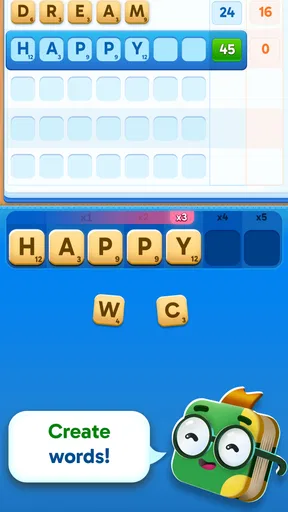
I like word games that make me pause over a choice instead of simply asking me to find the next obvious word. Wild Words is a free word game from IsCool Entertainment built around making words and using smart cards to increase a turn’s score. That combination gives it a more tactical feel than a plain word search, while keeping the central pleasure familiar: spotting useful letters and turning them into a strong play.
Its average rating is 4.9 from around 2.1 thousand ratings, and it has passed 10 thousand installs. Those figures suggest that players have responded warmly so far, though they can’t tell you whether its particular style suits you. I’d approach it as a compact, turn-by-turn vocabulary game rather than a messaging tool or an open-ended word puzzle.
How the turns invite you to think
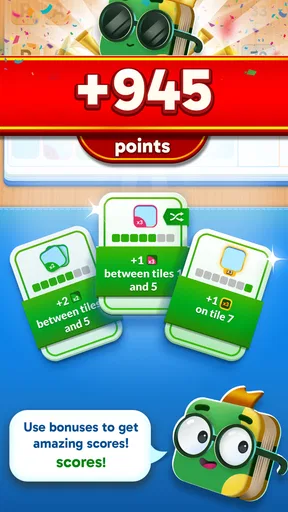
The appeal is in the tension between building a word and deciding how to get more from that turn. A card that multiplies a score can make a modest word more valuable, but using a useful card at the wrong moment may mean missing a better opportunity later. I enjoy that kind of decision because it gives familiar word-making a layer of planning without requiring a complicated strategy-game background.
Speed expectations: quick decisions, not frantic play
The basic idea is easy to grasp: form words, consider the cards available, and look for a way to improve the score. That should make the game approachable if you already enjoy word puzzles, even if you don’t normally play tactical games. The most satisfying turns are likely to be the ones where you spot a word and then pause to ask whether a card can make that play count for more.
I wouldn’t assume that every round will feel equally brisk. When a useful play is obvious, the decision can be quick; when several words or card choices seem promising, you may want time to compare them. That is a welcome trade-off for thoughtful players, but it may feel like friction if you want an automatic, rapid-fire puzzle that never asks you to weigh alternatives.
Heavy-use moments: make the cards work for you
The score-multiplying cards are the part I’d pay closest attention to as I learn the game. Rather than treating a card as something to use as soon as it appears, consider whether the word you can make now is worth boosting or whether saving the opportunity could lead to a stronger turn. That simple habit gives each move a little more purpose and helps prevent the game from becoming a series of unexamined plays.
A practical way to play is to identify your best word first, then review the card decision. This keeps the scoring tool from distracting you from the letters themselves. If you start by chasing a multiplier, you may overlook a better word; if you ignore the cards entirely, you may leave scoring potential unused. The interesting play sits between those extremes.
Worth Reading Before You Choose

EA SPORTS FC Mobile 26 Is a Bigger Football Game, but It Takes Time

Flipboard Shows What News Apps Must Do Beyond the Feed

Switching to Android Auto Means Rethinking Your Driving Routine

Google Calendar Makes a Crowded Week Easier to Manage

Ludo King Makes the Most of the Minutes Between Plans

Baby Panda World Brings Quick Play to Modern Phones, but Its Game Library Feels Busy
Reliability and the feel of a session
The available details don’t establish how the game behaves across every device or network situation, so I wouldn’t promise a particular loading time or uninterrupted performance. What matters for this style of game is whether you can settle into a few decisions without fighting the interface. Because the central loop is built around turns and word choices, it is naturally suited to brief sessions when you have a little spare attention.
For a fair first impression, I’d try it in a short session rather than expecting a long, dramatic campaign. Notice whether the pace of choosing words and using cards feels engaging to you, and whether you enjoy thinking about score as well as vocabulary. If a session is interrupted, don’t assume that a particular recovery or save behavior is guaranteed; check what the game itself shows when you return.
Device constraints and who will enjoy it
The game is listed for a minimum OS version of 7.1, and it is rated for Everyone, making its intended audience broad. That doesn’t mean every player will enjoy the same level of decision-making. Someone who likes finding words and squeezing extra value from a play is a better fit than a person looking only for a quiet, no-pressure letter search.
It is also worth distinguishing the free download from optional spending. In-app purchases range from $0.99 to $119.99 per item, so I’d check the purchase screen carefully and avoid tapping through choices without looking at the amount. If you’re setting up a device for a child, the Everyone age rating is useful context, but it is still sensible to review purchase controls on the device before handing over a game with in-app purchases.
Where it sits among word games
Compared with a traditional crossword, this game’s attraction is less about working through a fixed grid of clues and more about making a scoring decision with the words at hand. Compared with a simple word search, it asks you to think beyond recognition: the aim is not merely to spot a word, but to consider how the turn and its card choice affect the result. Players who enjoy vocabulary games with a tactical wrinkle should find that distinction meaningful.
If you prefer solo puzzles with a clear answer and no score-optimizing decisions, a crossword or word search may be a better choice. If you like competitive word play, check how the available play options work before deciding whether it fits your routine; the core concept alone doesn’t tell you how every session is organized. I’d choose this one for the mix of word-building and score planning, not on the assumption that it offers every familiar word-game mode.
Small habits that make the game more rewarding
One useful habit is to avoid settling on the first valid word. Take a moment to see whether a different word uses your options more effectively, then compare that play with the possible card benefit. This is not about calculating every turn like a tournament; it is simply a way to make the central mechanic matter instead of treating cards as decoration.
Another good approach is to notice which decisions slow you down. If you spend too long hunting for a perfect play, set a personal limit and choose a strong-enough option. If you tend to play impulsively, pause before using a multiplier. Those adjustments keep the game at a comfortable pace and help you work out whether you enjoy the strategy or would rather have a more straightforward puzzle.
Why you might choose a different game
The main limitation is also part of the game’s identity: players who want word creation without score tactics may find the card layer distracting. And anyone expecting a broad messaging or social platform should look elsewhere; this is a word game, not a replacement for texting. I’d also skip it if you strongly dislike optional purchase prompts or prefer games whose appeal does not depend on scoring decisions.
On the other hand, if you like asking “What is my best play?” and then “How can I make it count more?”, the concept has a clear reason to try it. The current version is 0.3.0, so I’d keep expectations focused on the game that is available now rather than assuming it already has every feature a long-established word-game series might offer. The free entry point makes it easy to see whether its turn-by-turn rhythm clicks for you, while the purchase range is a reason to stay attentive around checkout screens.
A practical verdict for everyday play
I can see this working well during a short break when I want a small mental challenge but don’t have the time or mood for a long session. For example, I might open it while waiting for a friend, make a few considered plays, and stop once I’m ready to move on. Its word-and-card combination gives that spare moment a little more texture than tapping through a basic search puzzle.
The strongest reason to try it is the way it joins vocabulary with turn-by-turn scoring choices. The strongest reason to hesitate is that the same choices may feel like extra work if you want a purely relaxing word game. I’d give it a try if you enjoy planning a play as well as finding a word, and choose a simpler puzzle if speed, certainty, or a completely low-pressure experience matters more.
For anyone deciding whether to install, the key question is not whether you like words in general; it is whether you enjoy making a word and then considering how a card can improve that move. The game is free, rated Everyone, and published by IsCool Entertainment, with optional in-app purchases. I’d start with the free experience, pay attention to the decision-making rhythm, and decide from that short trial whether the extra strategy is what you were looking for.
Getting Started with Wild Words
Jumping into Wild Words is as easy as pie. Just download the app from your favorite app store, and you're good to go. The interface is super intuitive, so you won’t find yourself lost in endless menus. The app's design is clean and colorful, which makes it feel like a game in itself. I was up and running within minutes, and I couldn't wait to start exploring.
The Art of Messaging
What sets Wild Words apart from other messaging apps is its focus on creativity. Instead of just typing out a message, you can craft your text with unique twists. Want to send a message with a pirate's accent or in the style of Shakespeare? You got it! There's a wide range of themes and styles to choose from, and each one adds a new flavor to your conversations. It’s like texting with a sprinkle of magic.
I found myself spending way too much time customizing my messages. The options are just so fun and engaging. Plus, the reactions I got from friends were priceless. It’s like being a digital poet or a text-based performer.
Features That Shine
One of my favorite things about the app is its seamless integration with multimedia. You can easily attach images, GIFs, and even voice notes to your wild messages. It’s all about enhancing the way we express ourselves. The app also supports group chats, so you can bring the whole crew along for the adventure.
The app offers a delightful feature called "Word Challenges" where you can challenge friends to craft sentences using random words. It's a hilarious way to test your creativity and vocabulary. You can earn points and badges, which adds a bit of friendly competition.
Connectivity and Sharing
Sharing your wild creations is a breeze. The app allows you to post your favorite messages on social media, spreading the fun beyond the usual chat boundaries. I love how it encourages sharing in such a vibrant way, making every message feel like a mini masterpiece.
And don’t worry about privacy. The app has robust settings to keep your messages secure. You can decide who sees what, ensuring your wild words are shared only with those you trust.
Why You Should Try It
Wild Words isn’t just another messaging app; it’s a revolution in how we communicate. It’s perfect for anyone who loves to add a bit of flair to their texts. Whether you're a wordsmith, a creative soul, or just someone looking for a fun way to stay in touch, this app has something for you.
The playful nature of the app makes everyday conversations feel like a special occasion. It’s like turning your chats into a canvas, painting them with words and style. Plus, it’s a fantastic way to break the monotony of regular texting.
Wrapping It Up
All in all, Wild Words is a refreshing take on messaging. It's an app that invites you to play, create, and connect in a way that's both entertaining and meaningful. If you’re ready to spice up your text life and impress your friends with your newfound linguistic flair, give it a shot. You won't regret it!
So, what are you waiting for? Dive into the world of Wild Words and let your messages run wild!
Pros
- User-friendly interface enhances navigation.
- Wide variety of word puzzles available.
- Daily challenges keep the game fresh.
- Offline mode for uninterrupted play.
- Engaging graphics and sound effects.
Cons
- Limited hints in free version.
- Occasional in-app ads can be intrusive.
- Requires frequent updates for new content.
- Some puzzles might feel repetitive.
- Leaderboard can be difficult to access.
FAQs for Wild Words
What is Wild Words, and how does it work?
Wild Words is an innovative word puzzle game designed for both Android and iOS platforms. The game challenges players to connect letters in a grid to form words, unlocking levels as they progress. Ideal for word enthusiasts, Wild Words offers varying difficulty levels, ensuring a captivating experience for players of all ages.
Is Wild Words free to download and play?
Yes, Wild Words is free to download from both the Google Play Store and Apple App Store. While the game offers optional in-app purchases for hints and additional features, players can enjoy the core gameplay without spending any money. This makes it accessible to a wide audience without financial commitment.
What are the system requirements for Wild Words?
Wild Words requires Android version 5.0 and up or iOS 10.0 or later. It is compatible with most modern smartphones and tablets. The game is lightweight, so it won’t take up much storage space on your device, ensuring smooth performance even on older devices.
Does Wild Words offer any multiplayer or social features?
Yes, Wild Words includes social features that allow players to connect with friends and compete on leaderboards. Players can share their progress, challenge friends to beat their scores, and even participate in weekly tournaments for additional rewards and recognition within the community.
Are there any advertisements in Wild Words?
While Wild Words is free to play, it contains ads that support the game’s development. These ads are non-intrusive and typically appear between levels. Players have the option to remove ads through a one-time in-app purchase, providing an uninterrupted gaming experience for those who prefer ad-free gameplay.


